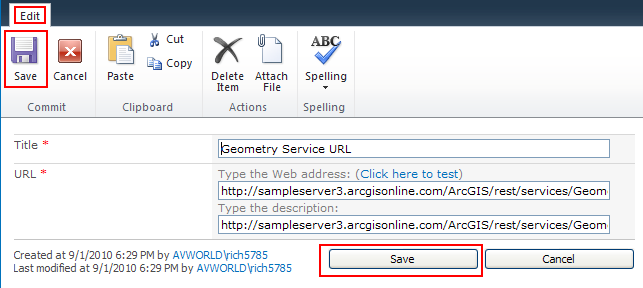
The ArcGIS Mapping Geometry Services list determines the geometry service endpoint used by ArcGIS Mapping to perform geometric operations. This is used, for instance, by the ArcGIS Map Web Part's Find Nearby operation and by the web part to project list items to spatial references other than WGS84 (WKID 4326) and Web Mercator (WKID 102100).
The number of geometry services included in the list is static. You should not add or remove items to or from this list. However, you can edit the existing item to specify any ArcGIS Server geometry service.
| Column | Description |
| Title | The identifier for the geometry service list item. |
| Url | The Url to the ArcGIS Server geometry service. If ArcGIS Mapping is not able to connect to the endpoint specified, it will attempt to use the ArcGIS Online geometry service. |
Navigating to the ArcGIS Mapping Geometry Services list
Like the other ArcGIS Mapping for SharePoint configuration lists and libraries, you can easily navigate to the ArcGIS Mapping Connections list using the ArcGIS Mapping Administration links on the Site Settings page:
-
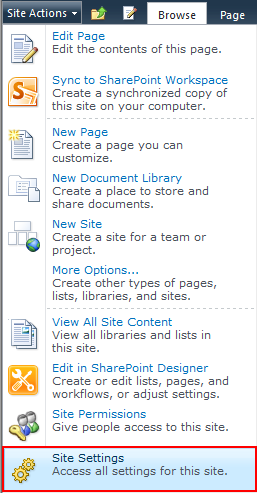
Navigate to the Site Settings page by opening the Site Actions menu and selecting Site Settings:
-
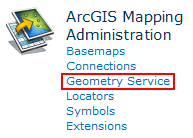
Under the ArcGIS Mapping Administration heading, click Geometry Service:
Edit the geometry service:
-
Open the item to edit by clicking on the hyperlink in the Title field:

-
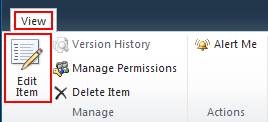
Click Edit Item on the dialog that appears:
-
Make your changes, then click Save: